



The semester ticket for students at TU Ilmenau has been a Germany Semester Ticket since the 2024/2025 winter semester. The ticket is offered under a solidarity-based model. This means that the ticket is offered at a reduced rate, but all students must pay for it. You have therefore already paid for the ticket as part of your semester fees.
On behalf of the Student Council (StuRa), the Student Services Organization (Studierendenwerk) handles the practical implementation of the ticket in coordination with the transportation companies. For the student body at TU Ilmenau, the Ilm District, through IOV Omnibusverkehr GmbH, is the contractual partner for the Germany Semester Ticket.
How do I get my ticket?
You can purchase the Germany Semester Ticket through a portal operated by the Central Thuringia Transport Association (VMT). There, you’ll need to log in using your university credentials. If you’re new to TU Ilmenau, it’s therefore important that you activate your university account first.
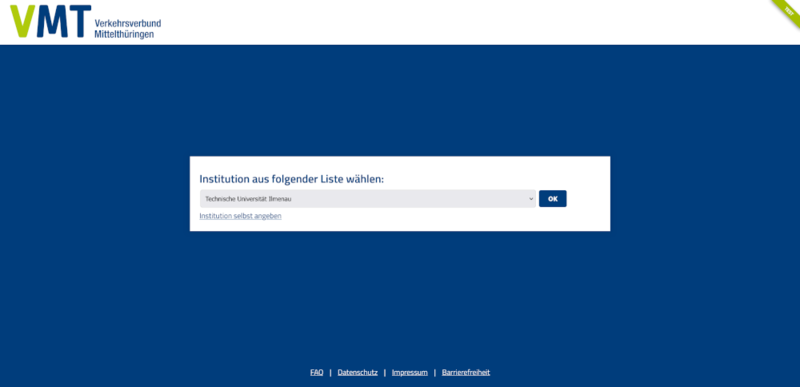
Select the Technical University of Ilmenau in the booking portal and confirm by clicking OK. You will then be redirected to the login window, where you can log in with your university account. After successfully logging in, you’ll see which data will be transferred to the booking portal, and you’ll be asked to consent to this. Select the option that best suits you regarding the duration of data sharing, and confirm by clicking “Accept.”
Please double-check that your personal information (name, date of birth in YYYYMMDD format, and email address), which is transmitted to the booking portal via the university login, is correct. This is important, among other things, for retrieving your ticket in the IKV Ticket App later on. If the information is incorrect, you could also run into problems during a ticket inspection. If the information submitted is incorrect, cancel the ticket booking and first have the incorrect data corrected by the university (studierendensekretariat [at] tu-ilmenau.de).
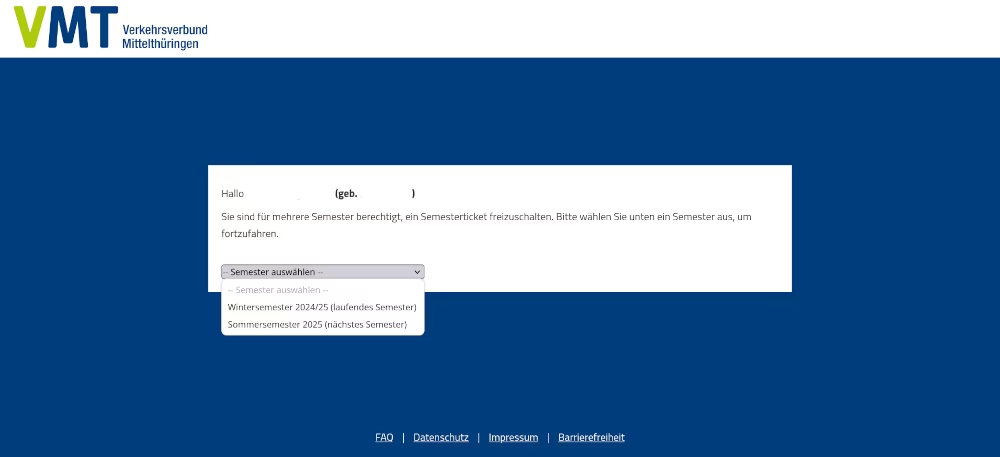
After logging in with your university account, you’ll see whether you’re eligible to apply for a ticket. If so, it should look like the images below. If you’re eligible for multiple semesters, you can first select the semester for which you’d like to book a ticket. If eligibility was found for only one semester, you’ll be redirected directly to the next page. There, you can click “Activate Semester Ticket.”
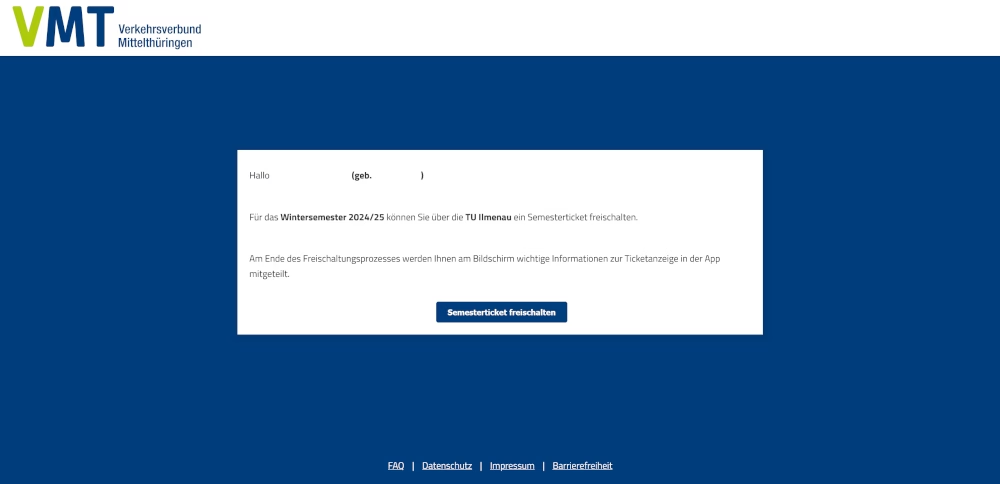
You will then receive an email at your university email address. In this email, you will find a subscription number. Using the subscription number and your date of birth, you can retrieve your ticket in the IKV Mobil app starting at the beginning of the semester (Oct. 1 or Apr. 1).

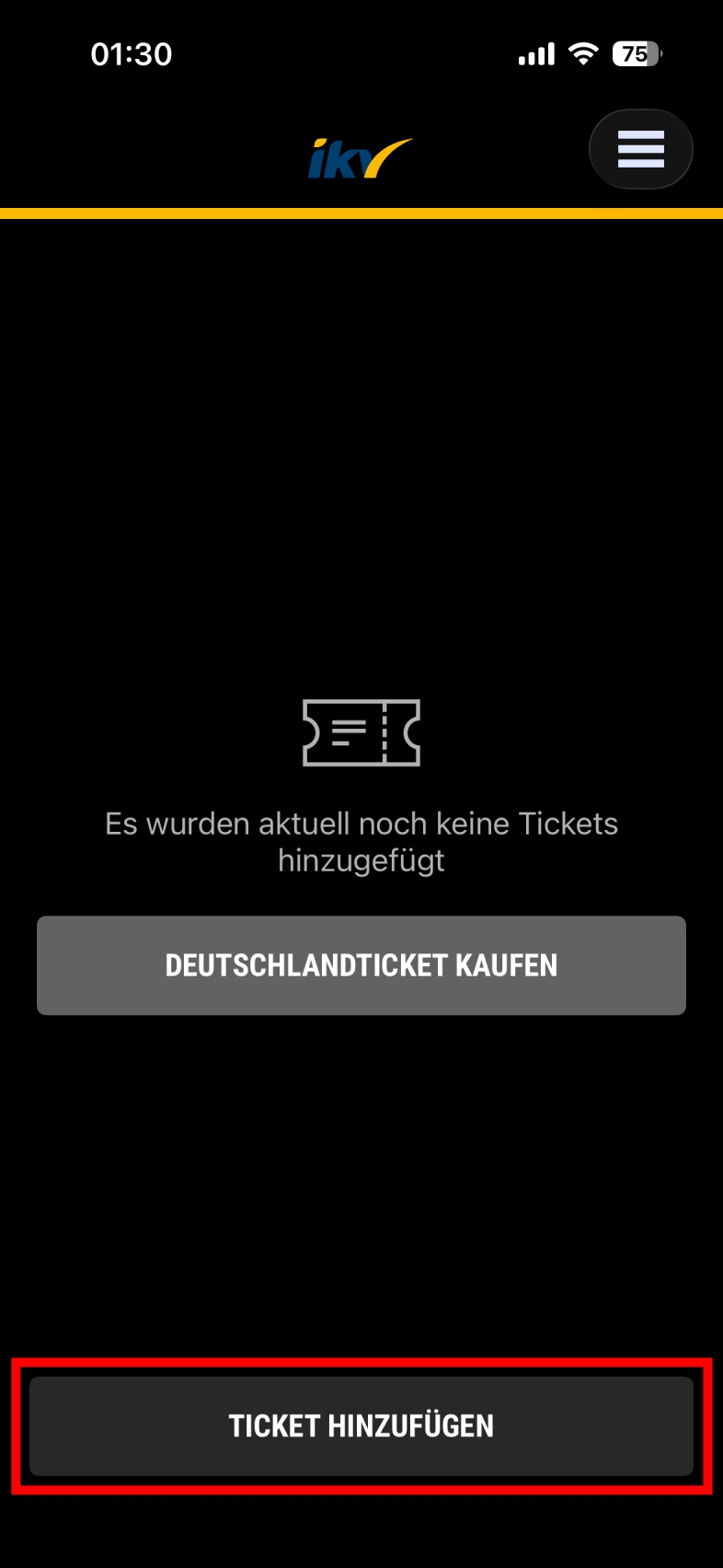
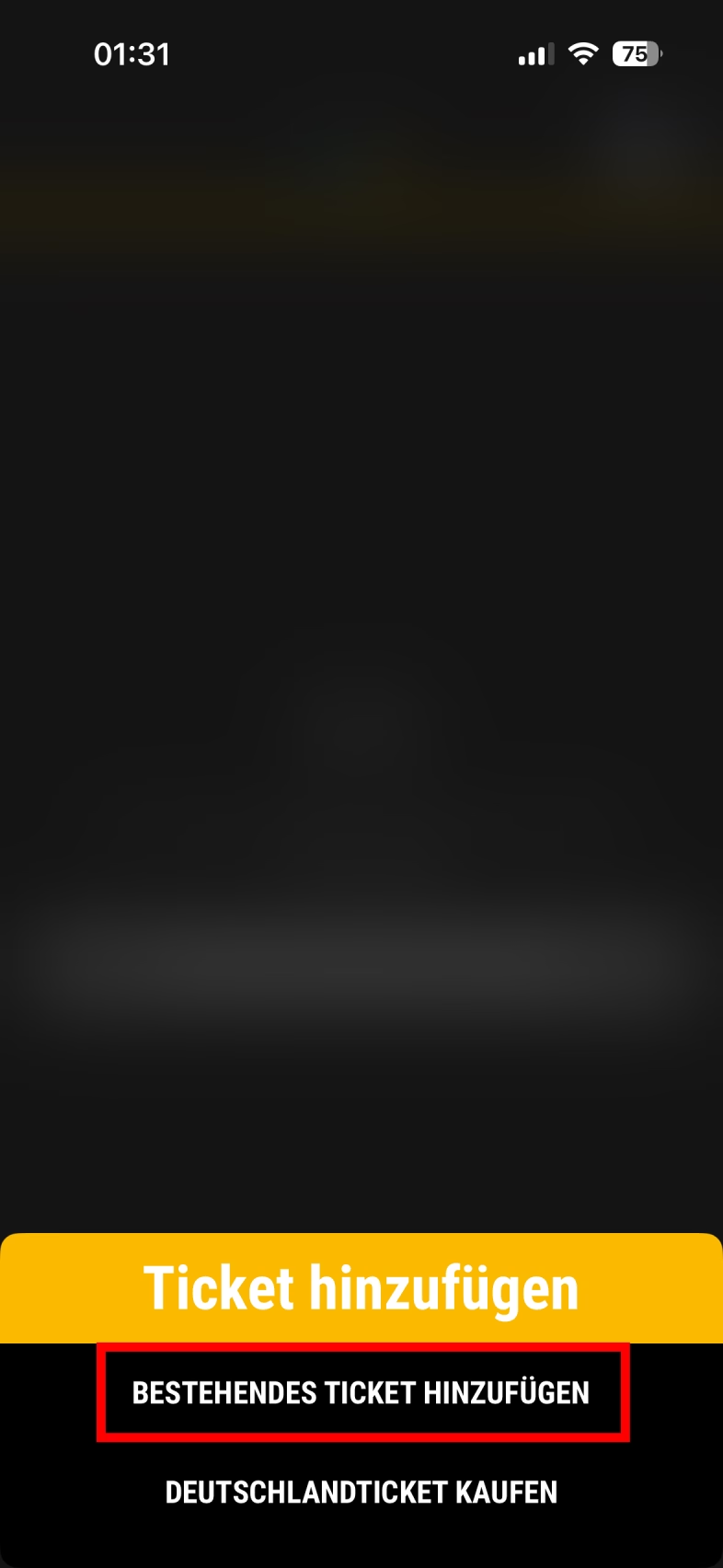
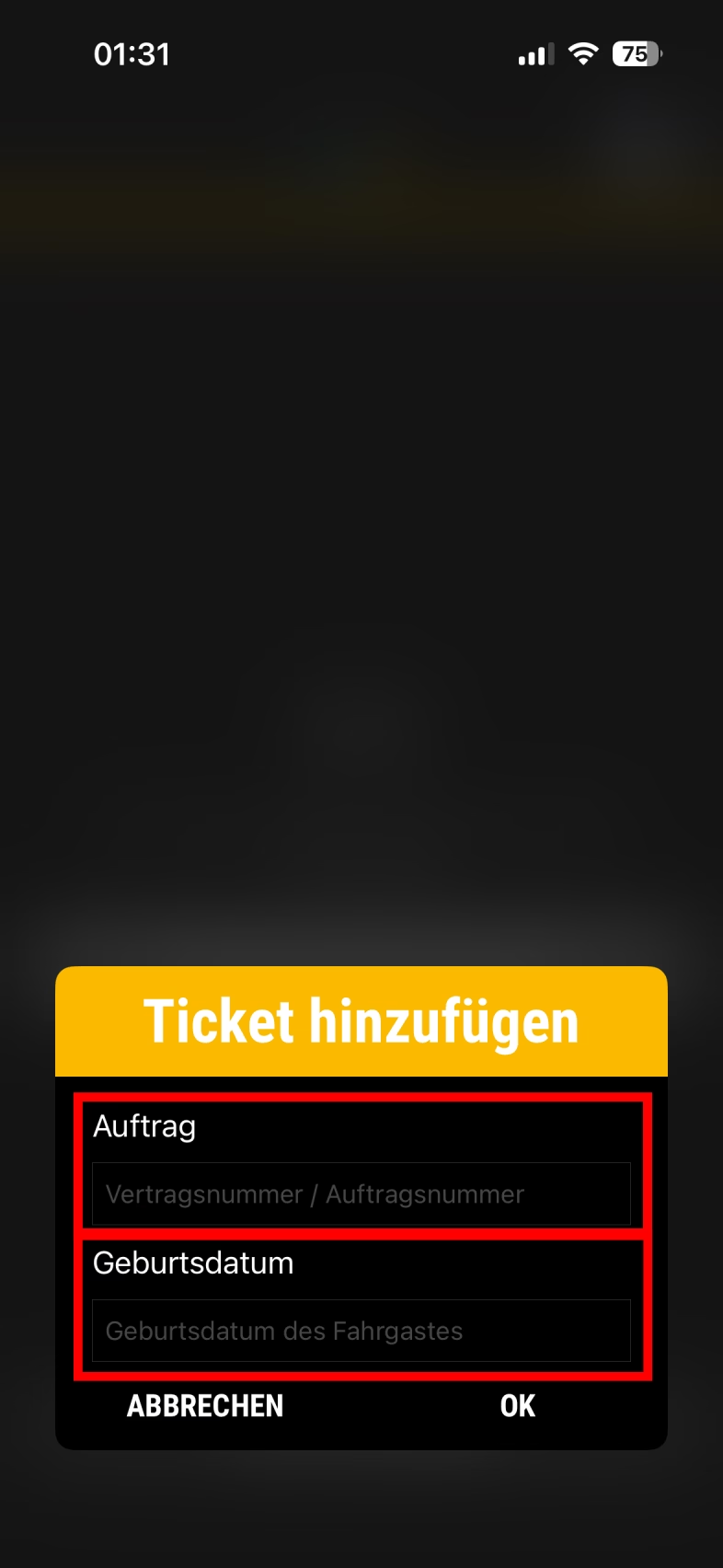
In the IKV Mobil app, tap the menu icon in the upper-right corner and select "My Tickets" from the drop-down menu. To retrieve your ticket, select “Add Ticket” at the bottom and then choose “Add Existing Ticket.” Next, enter your subscription number in the “Order” field and your date of birth (DD.MM.YYYY) in the “Date of Birth” field, then confirm by clicking “OK.” Your ticket will now appear in the overview when you launch the IKV Ticket app. Tapping the ticket will take you to the QR code, which you’ll need in case of a ticket inspection. The ticket updates automatically every month until the end of the semester.
Is the ticket also available as a smart card?
Yes. If you are unable to use the ticket on a smartphone via the IKV Ticket app, you can also receive the ticket as a chip card. However, it is not possible to issue both an app ticket and a chip card for the same person. Please contact the IKV Service Center with your subscription number, which you received at your university email address after booking the ticket on the VMT portal (see above).
A chip card can be issued or renewed even before the ticket’s first day of validity.
The IKV requires the following information from you to issue the chip card:
- Name
- Date of birth
- Address
- Student ID number
- University email address (for inquiries)
- Phone number (for inquiries)
Please bring a form of identification with you so we can verify your information.
You can find the IKV Service Center here:
- Ilmenau: Marktstraße 1–3, Mon–Fri: 7:30 a.m. to 6:00 p.m.
- Arnstadt: Erfurter Straße 33, Mon–Fri: 7:30 a.m. to 6:00 p.m.
It should take about two to three business days to issue the chip card (however, it might take a little longer if there are many requests). After that, you can pick up your card at the IKV Service Center.
When you renew your card, it will be reprinted, and the new ticket will be stored on the card in addition to the one from the previous semester.
Validity
The semester ticket is valid wherever the Deutschlandticket is valid—roughly speaking, on German regional transit (ÖPNV) with all participating transit authorities and companies. This includes, for example, regional trains (RB), regional express trains (RE), interregional express trains (IRE), S-Bahn, U-Bahn, streetcars, and buses. Please note that there may be exceptions.
The ticket is not valid on long-distance services. These include, for example, InterCity (IC), InterCityExpress (ICE), EuroCity (EC), or FlixTrain. There are also Regional Express (RE) trains operated by DB Fernverkehr. Travel on these trains is also not permitted.
On some IC routes, travel with the Deutschlandticket is possible. In Thuringia, for example, this applies to the IC route from Erfurt via Weimar and Jena to Gera. This route can also be used in both directions between these cities with the Deutschland Semester Ticket. In addition, there are other IC routes on which the Deutschlandticket is accepted.
You can sometimes check whether the Deutschlandticket is valid on an IC route in the DB Navigator app by clicking on “Trip Information” for a connection and then scrolling all the way down to the information section.
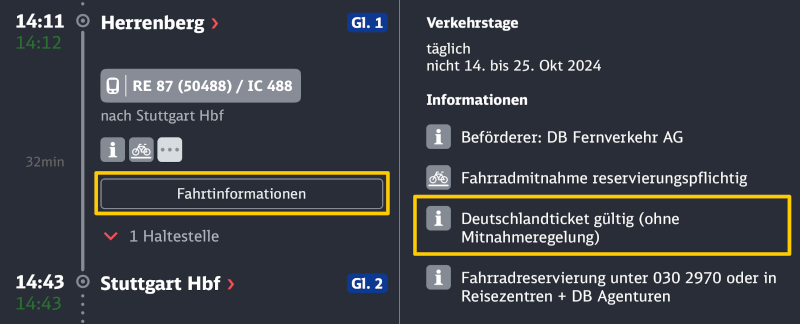
Before you start your trip, please check whether the Deutschlandticket is valid on the modes of transportation you plan to use. Pay particular attention to any exceptions or special rules that may apply.
The Germany Semester Ticket is only valid when presented with an official photo ID. So always make sure to carry your ID card or something similar with you.
Screenshots of ticket QR codes may be flagged as invalid during a check because the QR code's digital signature changes regularly. As a result, a screenshot can quickly become outdated and may no longer be recognized as valid. That is why it is important to always use the most recent QR code.
Bicycle Transport
Bicycle transport is not included in the ticket price. You’ll need to check whether you can bring your bicycle on your route for free or if you need an additional ticket for it.
In Thuringia, bicycles can generally be transported free of charge on local trains if there is enough space on the train. You can find more information here:
Bringing Children Along
The Germany Semester Ticket does not include travel for children. However, children under the age of 6 can often ride for free. In the VMT area, children under the age of 8 who have not yet started school may also ride for free when accompanied by an adult.
Refund of the ticket price
Under certain circumstances (e.g., a semester of leave or withdrawal after the re-registration deadline but before the start of the semester), you may be able to get a refund for the ticket price you paid from the Studierendenwerk.
To receive a refund of the ticket price along with your semester fee, it is important that you have not yet booked the ticket through the VMT portal. If you have already done so at the time of your application, a refund is no longer possible!